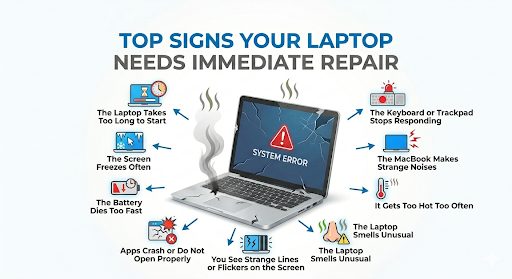
A laptop often gives warning signs before it stops working completely. Many people ignore these signs because the device still turns on and seems fine. But you don’t know that some issues are damaging your laptop silently, which might lead to a bigger problem later on.
But you don’t have to worry at all! We have written this blog and cover the top signs that might show your laptop needs an immediate repair. Read this blog till the end so that you can take necessary actions before it’s too late!
1. The Laptop Takes Too Long to Start
A slow startup is one of the annoying things that wastes a lot of your time and gets you frustrated as well. If your laptop takes several minutes just to open, something may be wrong with the hard drive, operating system, or memory. It may also have too many background programs, but if the delay gets worse over time, do not ignore it.
A healthy laptop should wake up at a reasonable time. When the waiting grows from a few seconds to several minutes, this clearly means that your system needs a repair. This is usually one of the 1st signs that your laptop is experiencing some pressure. To properly diagnose and fix these issues, you can consider getting a professional computer repair service for a detailed system check-up.
2. The Screen Freezes Often
Some people notice their laptop’s screen freezes during normal use. This means your laptop is not okay. You may notice the mouse pointer stops moving, the keyboard does not respond, or one app locks up the whole system.
A one-time freeze may not be serious. But when it happens on a repeated basis, it’s a different story. They can point to damaged files, memory problems, overheating, or a failing storage drive. If you keep forcing restarts, you may make the problem worse.
3. The Battery Dies Too Fast
Every laptop battery wears out with time. But when the laptop battery runs out of charge and it takes an extremely short period of time to change, then there may be an issue with the battery in your laptop. You can also notice the battery percentage increase and decrease, or the laptop can turn off while having a sufficient charge remaining in the battery.
This problem can be risky if you use the laptop away from a charger. It can also indicate an issue with power within the device. If the battery swells, feels hot, or no longer holds a charge at all, stop using it and get it checked.
4. The MacBook Makes Strange Noises
MacBooks are designed to run quietly. If you hear grinding, clicking, or loud fan noise, something may be wrong. A loud fan can mean dust buildup or overheating. A clicking sound from inside the laptop may point to a failing hard drive.
Do not wait for the sound to get louder. Get immediate MacBook repair service and have the issue diagnosed before it leads to serious damage. Because these types of strange noises often mean one or some part is wearing out. Once that part fails, your files and your laptop may both be at risk.
5. It Gets Too Hot Too Often
A warm laptop is normal. But when a laptop feels very hot or shuts down by itself too often is not normal. Heat can damage the battery, motherboard, and other valuable parts inside the machine.
These signs might mean the internal parts are covered with dust, vents are blocked, thermal paste becomes old, or a broken fan can all cause overheating. So, you must stop using your laptop because it’s a clear sign that it needs repair right away.
6. Apps Crash or Do Not Open Properly
If your apps close on their own, fail to open, or show error messages often, the laptop may have a deeper problem. This can happen because of bad files, low memory, malware, or storage trouble.
Many people blame the app first, but repeated crashes across different programs usually point to the laptop itself. When you notice these problems happen on a regular basis, you should back up your files and get the device checked.
7. The Keyboard or Trackpad Stops Responding
Typing problems and trackpad issues can seem small at first. A few missed keys or a slightly stuck touchpad may not look serious. But when the keyboard types the wrong letters, repeats keys, or stops working completely, the laptop needs attention.
Liquid spills, loose connections, or internal damage may cause these problems. If one part of the laptop no longer responds, do not keep pressing harder. This can cause more damage.
8. You See Strange Lines or Flickers on the Screen
A screen that flickers, changes color, or shows random lines can have a display problem or a loose connection. In some cases, the screen is damaged, not the inner parts. And in some other cases, the graphics chip or cable has an issue.
Do not assume the problem will fix itself. If the display gets worse, you may lose the picture completely. That makes it harder to use the laptop and harder to repair later.
9. The Laptop Smells Unusual
A burning smell, plastic smell, or any strange odor from the laptop is a warning sign. Turn off your computer right away. Because this type of unusual smell might be a big risk and shows that some parts, such as the battery, fan, or other components, are malfunctioning or overheating.
This is one of the main signs that you should stop using the laptop right away and get immediate computer repair. Safety matters more than finishing one more task.
Why Fast Repair Matters
A laptop often gives these signs before a total breakdown. If you act early, you may save your files, reduce repair costs, and avoid long downtime. This matters for students, office workers, and anyone who depends on one device every day.
What You Should Do Next
First of all, you need to back up all your important files, photos, and work data to any cloud storage platform or to an external hard drive. After doing these, stop using the laptop right away if it shows any smell, heat, or power issues.
Then call for a professional motherboard repair service and share the symptoms clearly. Tell them in detail about when and how it was started. The more detail you give them, the quicker they can reach your problem and fix it.
Source: FG Newswire